
Designing a high-capacity surveillance system requires more than just plugging in cables; it requires a strategic network layout. For a 32-channel system, a “Star Topology” using an Aggregation Switch is the gold standard for maintaining high bandwidth and system stability.
Here is the professional breakdown of the architecture shown in the diagram.
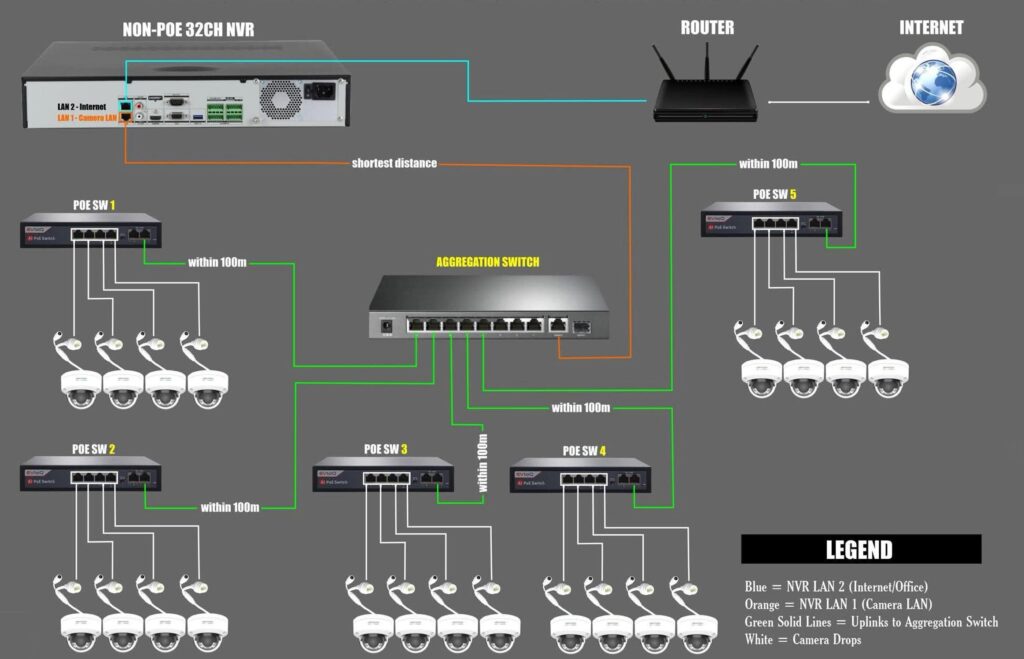
The Core Architecture: The “Star” Setup
In this configuration, the Aggregation Switch acts as the central hub (the center of the star). Instead of 32 individual cables running back to the NVR, multiple PoE Switches act as localized nodes that funnel data into the central hub.
1. The Power Source: PoE Switches 1–5
These switches are distributed throughout the building. Each one provides Power over Ethernet (PoE) to a cluster of cameras.
- Distance Management: By placing these switches within 100m of the cameras, you ensure consistent power delivery and data integrity.
- Efficiency: This reduces “cable home-runs,” where every single camera wire must reach the server room.
2. The Traffic Controller: The Aggregation Switch
All five PoE switches connect via a Green Uplink to the Aggregation Switch.
- This switch consolidates the massive stream of 4K or 1080p video data.
- It ensures that the “Camera LAN” remains a high-speed, closed-loop environment.
3. The Brains: Non-PoE 32CH NVR
Since the NVR isn’t providing power, it stays cooler and performs more efficiently.
- Orange Line (LAN 1): This is the “Data Highway” from the Aggregation Switch to the NVR. It carries all 32 video feeds through a single high-speed connection.
- Blue Line (LAN 2): This connects the NVR to your Router. This provides “Internet/Office” access, allowing you to view cameras on your phone without the camera traffic slowing down your office Wi-Fi.
Top 3 Benefits of This Professional Build
| Benefit | Why it Matters |
| Network Isolation | By separating the Camera LAN (Orange) from the Internet LAN (Blue), you protect your system from IP conflicts and enhance cybersecurity. |
| Scalability | Need to add a camera in the north wing? Just plug it into PoE Switch 5. You don’t need to run a new 300ft cable back to the NVR. |
| Reliability | If one PoE switch fails, only those 4–8 cameras go down. The rest of the “Star” stays online, making troubleshooting much faster. |
Technical Requirement: The 100m Limit
Standard Ethernet (Cat5e/Cat6) has a physical limit of 100 meters (328 feet). As noted in the diagram, every link—from camera to switch, and switch to hub—must stay within this range to avoid “packet loss,” which causes choppy video or dropped signals.