
While Wi-Fi gets all the glory, the high-speed stability of modern enterprises still relies on the humble Ethernet cable. Specifically, Category 6 (CAT6) has become the industry standard for balancing cost, performance, and future-proofing.
But what is actually happening inside that cable to allow for gigabit speeds? Let’s strip back the insulation and look at the engineering that powers your network.
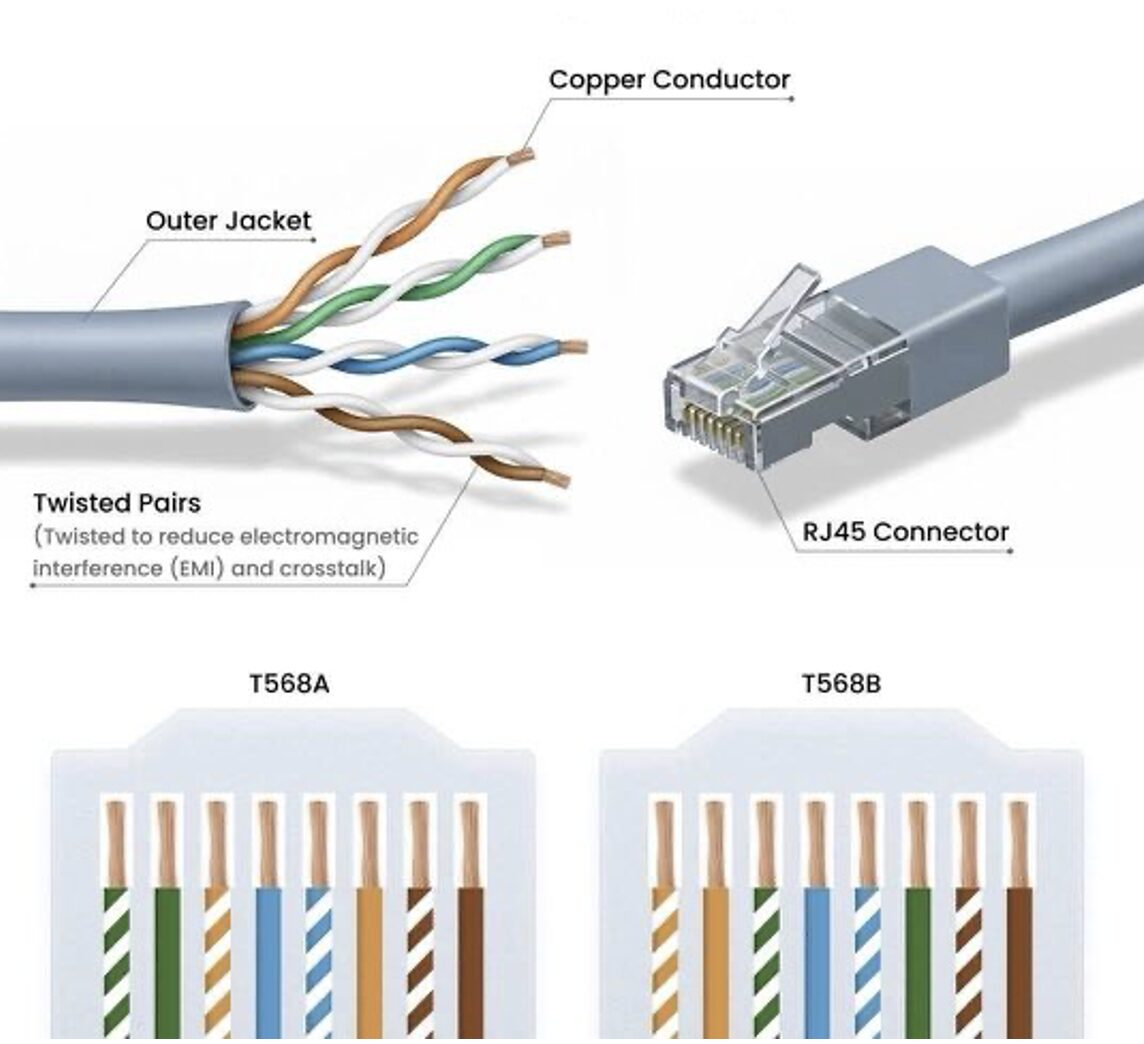
1. The Internal Anatomy: Engineering Against Interference
As shown in the diagram, a CAT6 cable isn’t just a bundle of wires; it is a precisely engineered environment designed to fight Electromagnetic Interference (EMI).
- Pure Copper Conductors: Unlike cheaper “Copper Clad Aluminum” (CCA) alternatives, professional-grade CAT6 uses solid or stranded pure copper. This ensures the lowest possible resistance and the highest signal integrity over long distances.
- The Power of the Twist: You’ll notice the wires are twisted into four distinct pairs. This isn’t for flexibility—it’s for physics. Each pair has a different “twist rate” (lay length). This mathematical precision ensures that the magnetic fields generated by one pair cancel out the noise from the others, a phenomenon known as Crosstalk.
- The Spline (Internal Divider): While not visible in every diagram, many CAT6 cables include a longitudinal plastic separator (a “spline”) that physically keeps the four pairs apart, further reducing interference and allowing for tighter twists.
2. Decoding the Standards: T568A vs. T568B
The most common point of confusion for IT professionals and DIY enthusiasts alike is the wiring sequence at the RJ45 Connector.
T568B: The Modern Standard
T568B is the most widely used standard in the United States and for commercial networking. If you are walking into an existing office building, 99% of the time, the infrastructure is terminated using the “B” sequence (Orange/White, Orange, Green/White, Blue, Blue/White, Green, Brown/White, Brown).
T568A: The Legacy/Residential Choice
T568A is often found in older government installations and some residential setups. It is technically backwards-compatible with older phone line wiring (USOC), which is why it persisted in home builds for so long.
The Golden Rule of Termination: > Electrically, there is no performance difference between A and B. However, consistency is non-negotiable. If you mix T568A on one end and T568B on the other, you create a “Crossover Cable.” While modern “Auto-MDIX” switches can often handle this, it is considered poor practice and can lead to mysterious drops in network speed.
3. CAT6 Performance Specifications
Why choose CAT6 over the older CAT5e or the newer CAT6A? Here is how the specs break down:
| Feature | CAT5e | CAT6 | CAT6A |
| Max Data Rate | 1 Gbps | 1 Gbps (up to 10 Gbps) | 10 Gbps |
| Bandwidth | 100 MHz | 250 MHz | 500 MHz |
| Max Distance | 100 Meters | 55 Meters (at 10Gbps) | 100 Meters |
| Best For | Basic Home Use | Modern Offices / Gaming | Data Centers |
4. Professional Best Practices for Installation
If you are running these cables yourself, keep these three professional tips in mind:
* Respect the Bend Radius: Never bend a CAT6 cable tighter than 4x its diameter. Kinking the cable can physically displace the internal twists, leading to permanent performance degradation
* Don’t Over-Untwist: When terminating into an RJ45 jack, keep the “untwisted” portion of the wires as short as possible (ideally less than 0.5 inches). Excessive untwisting introduces noise right at the connection point.
* Label Everything: A cable without a label is a future headache. Use a wrap-around labeler at both ends of every run.
Conclusion
The CAT6 cable is a masterpiece of signal processing hidden in plain sight. By understanding the importance of the internal twists and the necessity of adhering to the T568B standard, you ensure that your network remains fast, stable, and easy to maintain for years to come.